Liquid handling robot controller
Design challenge
A quick science lesson
- For the sake of this case study, consider a biology experiment the act of mixing various liquids together and measuring the outcome
- Scientists at Ginkgo use robots to mix tiny amounts of liquid inside containers. Containers typically have 96 or 384 wells, laid out in a grid
- Inside each well is a sample of liquid that plays a role in the experiment. Samples can be DNA, cells, chemical reagents, controls, etc.
- Scientists need to instruct robots when and where to mix each sample prior to running their experiment
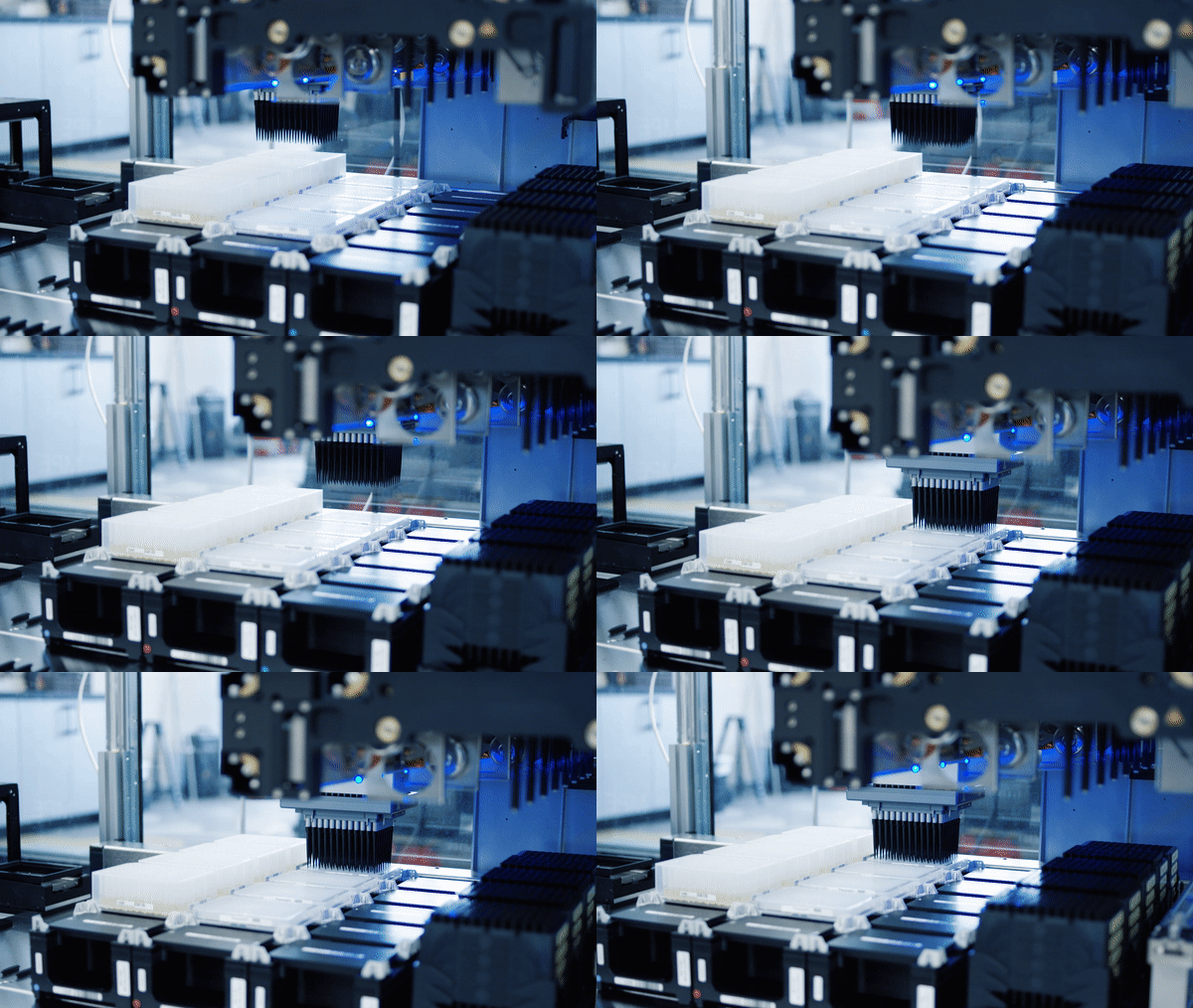
Robot transferring liquid
Ginkgo scientists need easy-to-use robots
- For Ginkgo scientists, access to automation can be either a luxury or obstacle. New employees join as experts in their field (biology.) They aren’t necessarily experts at programming robots
- The software used to control robots needs to be efficient with a low learning curve
- If the software is too hard to use, scientists will opt to run experiments the ‘old fashioned way’ (by hand), which is slow and error prone
As Ginkgo scales, the business cost of inefficient software multiplies
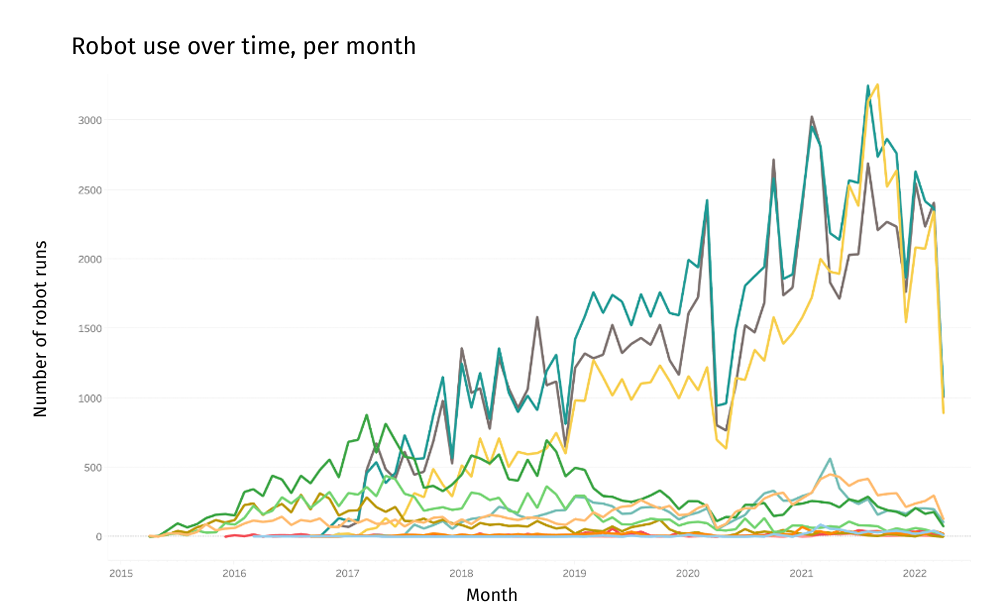
Scientists used robots more and more each month
The old software wasn’t meeting their needs
- The old software was built while Ginkgo was in it’s early-stage startup phase, there was no designer (or PM) at the time
- Users were abandoning the software in favor of DIY workarounds, they weren’t tracking their experiments using Ginkgo systems
- From prior research, we knew it took months before scientists could run their own experiments on the Ginkgo platform, this software was a big culprit
“The software provides the functionality you need to do your work, but the UI is not the most intuitive”
“It’s much faster and cheaper to do liquid transfers by hand if it’s small scale.”
“I find it frustrating to spend a lot of effort creating a beautiful liquid transfer only to find that I messed up.”
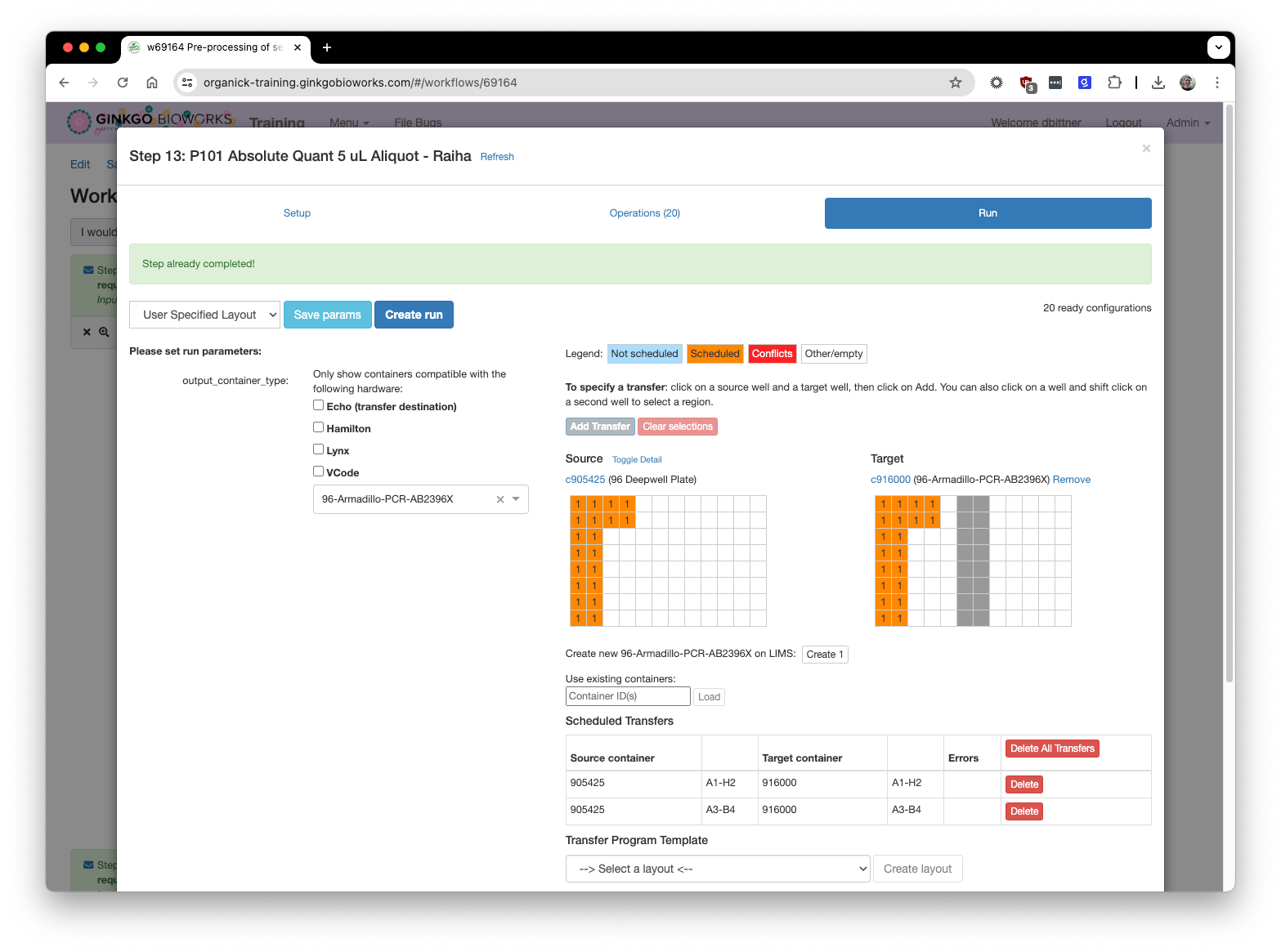
The old software was confusing
It was time for a redesign
- The new design should require little to no training
- The new design patterns must be flexible and extend to future use cases
- Setting up an experiment for a robot should take less time than it takes to execute the same experiment at the lab bench
Actions taken
We formed a team
- I worked with 5 developers, 1 PM, and a PM/UX hybrid
- The PM/UX person was considering a career change to UX. She lead the discovery research that fed into this project, and contributed to most of the user research highlighted in this case study. I showed her the ropes and walked her through my UX process at every step. (She eventually transitioned to a full-on UX designer and took over this project for 2 more years)
Sketching helped me explore many ideas quickly
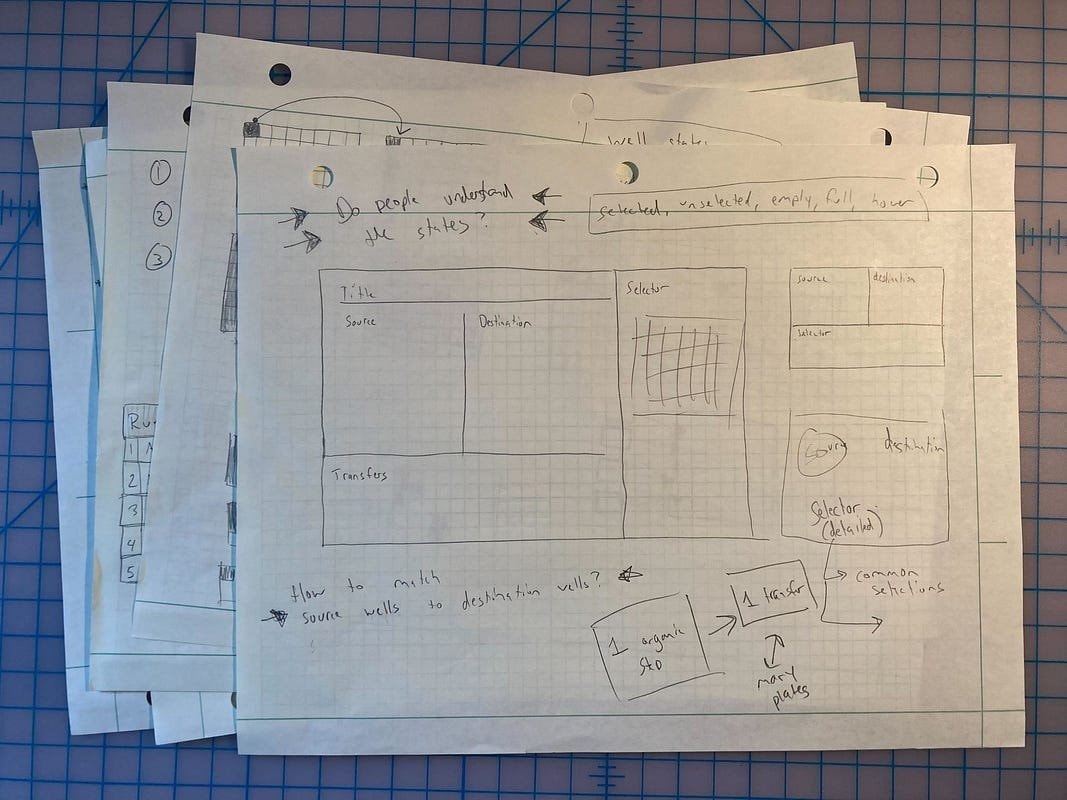
I used sketching to lay out the new interface and establish an information hierarchy
Prototypes were a quick, cheap way to bring ideas to life
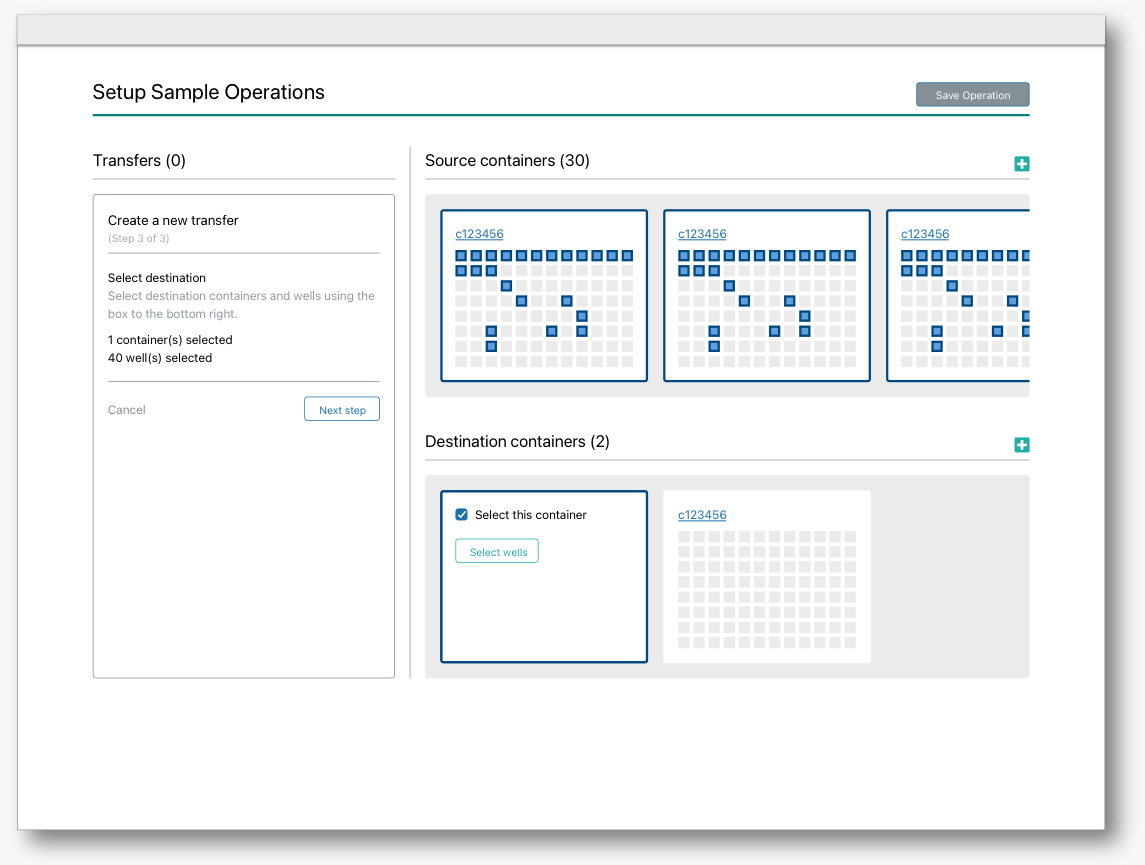
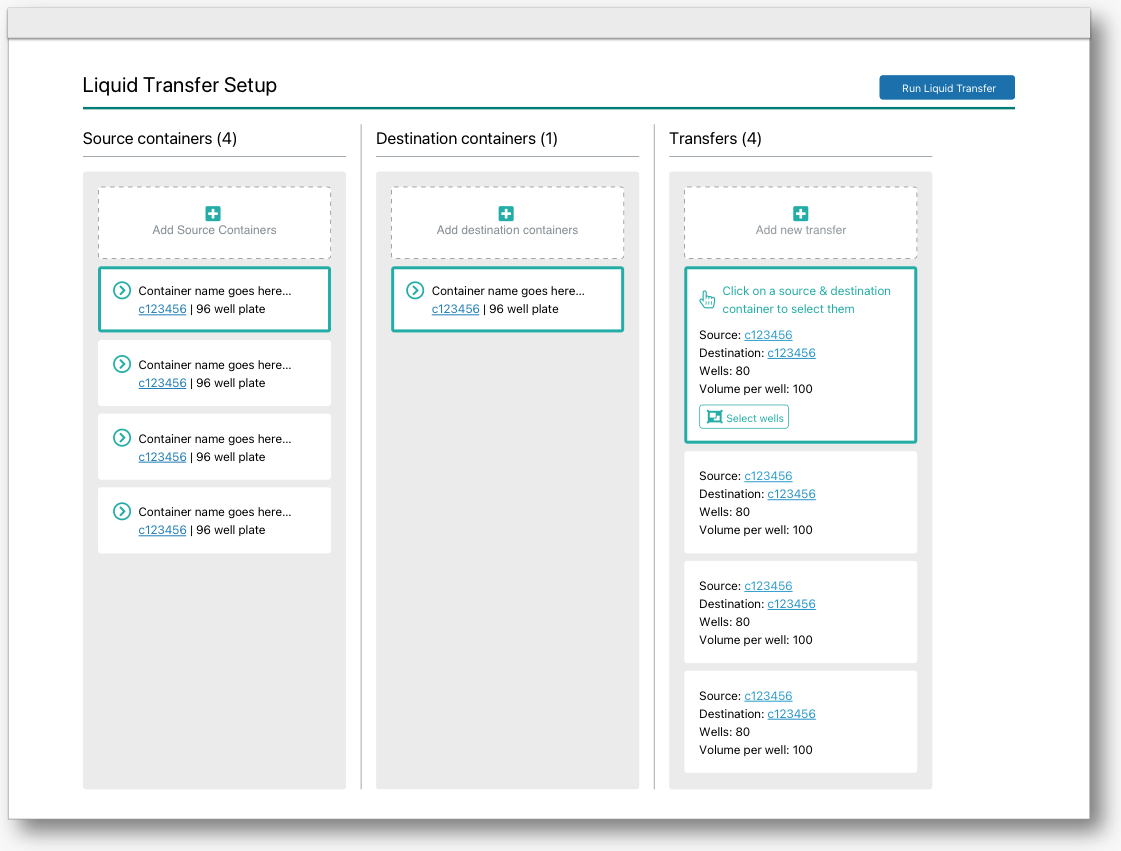
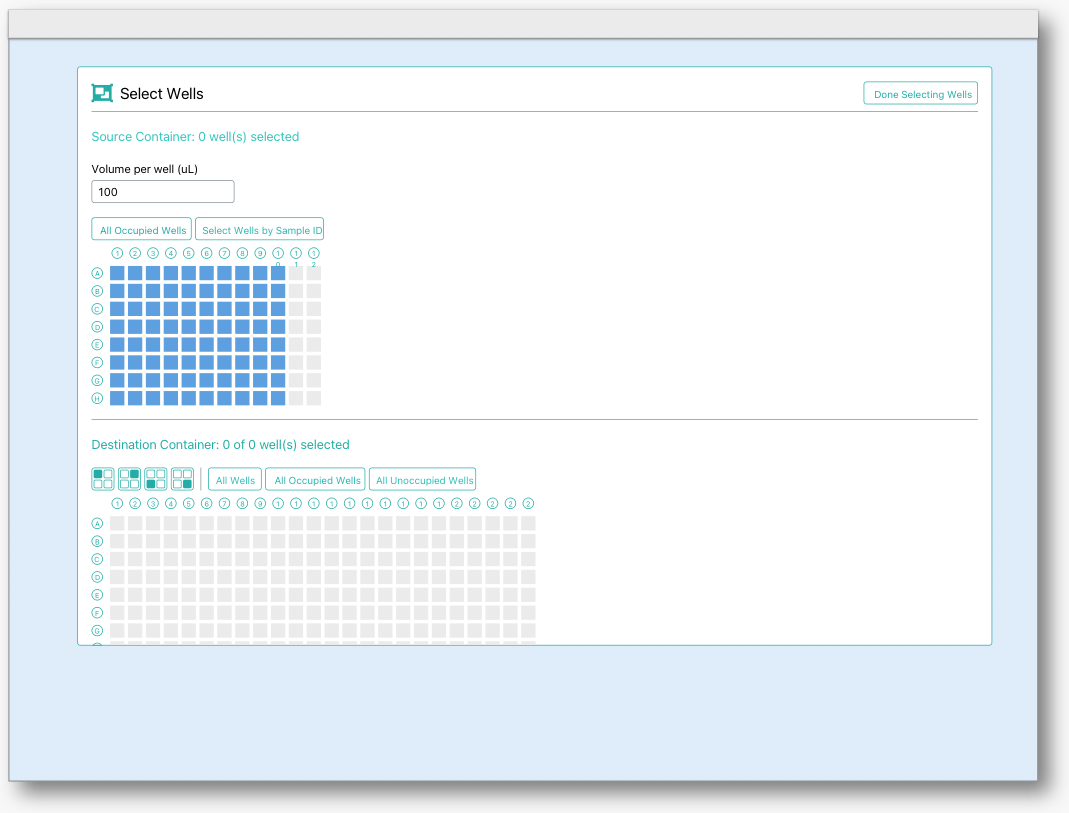
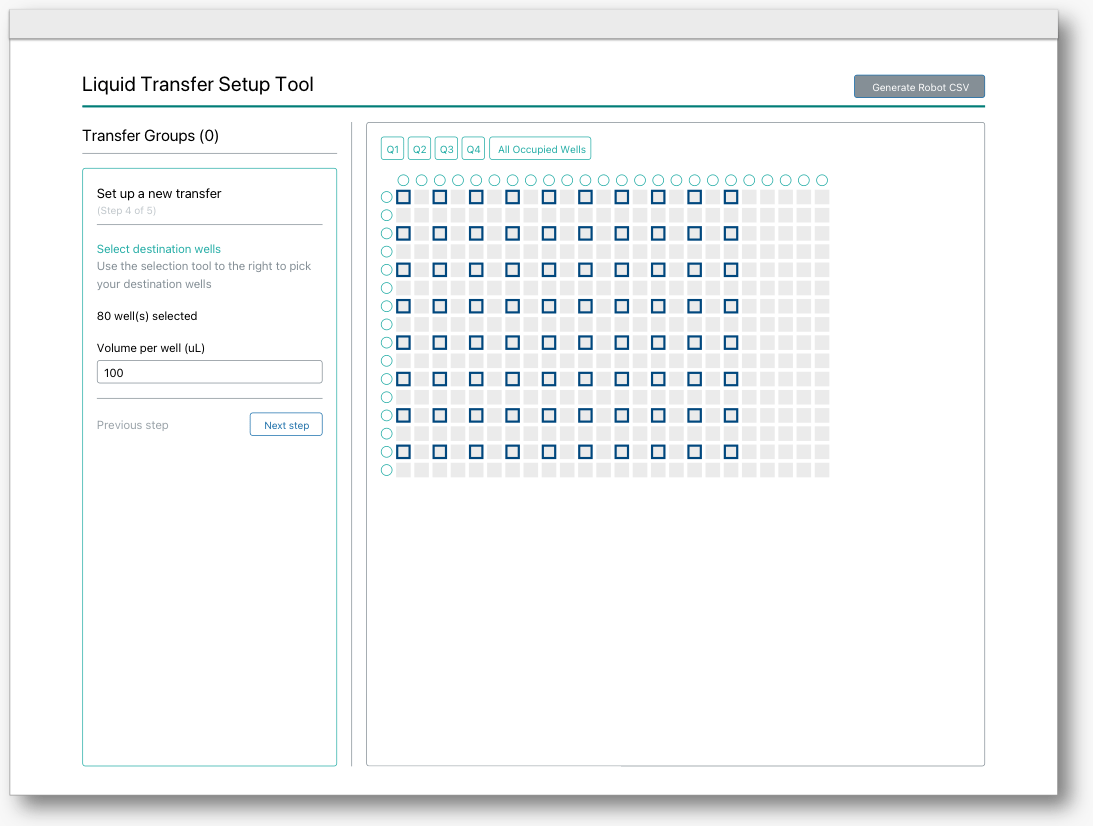
Rapidly iterating through interaction and layout ideas
I tested with paper prototypes for fast feedback
- Once I was happy with the first round of designs I printed out each screen and showed them to 10 scientists over 2 rounds of feedback
- I gave each user testing participant a marker and encouraged them to draw on top of the prototypes. I asked them to think out loud as they went through each screen
- I also prepared some questions to probe their mental models and understand key concepts
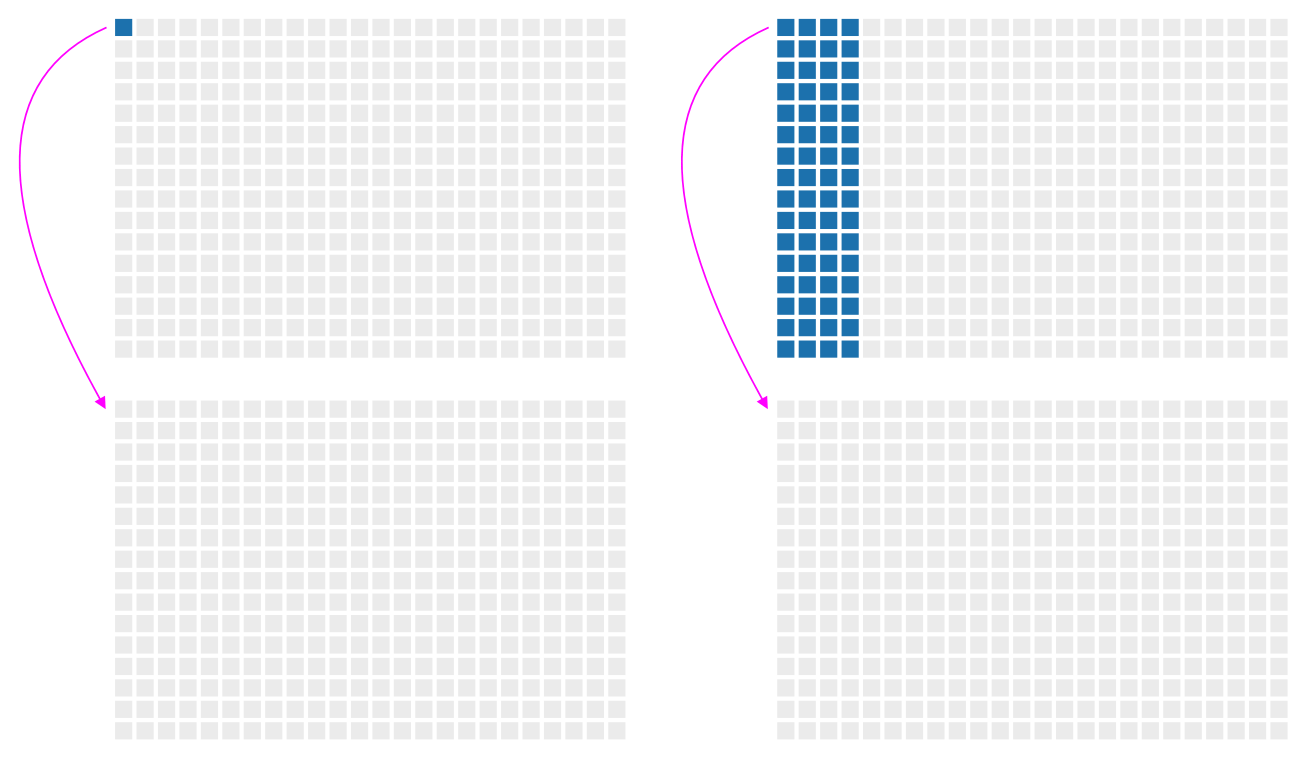
Do scientists consider the right image 1 transfer, or 64?
I evaluated other designs in the wild
- Several participants pointed me towards a piece of software with a similar interaction (used for a different purpose)
- They particularly liked the selection buttons at the bottom of the screen
- I incorporated similar selection buttons in my prototypes
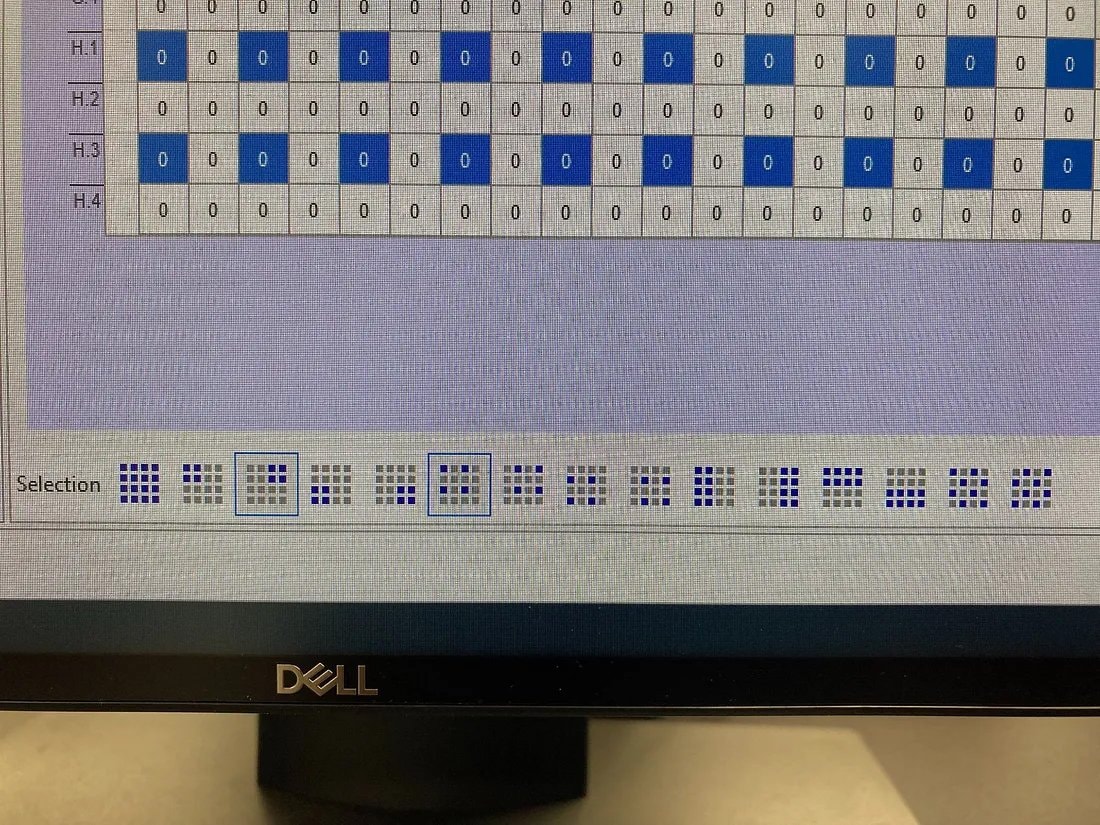
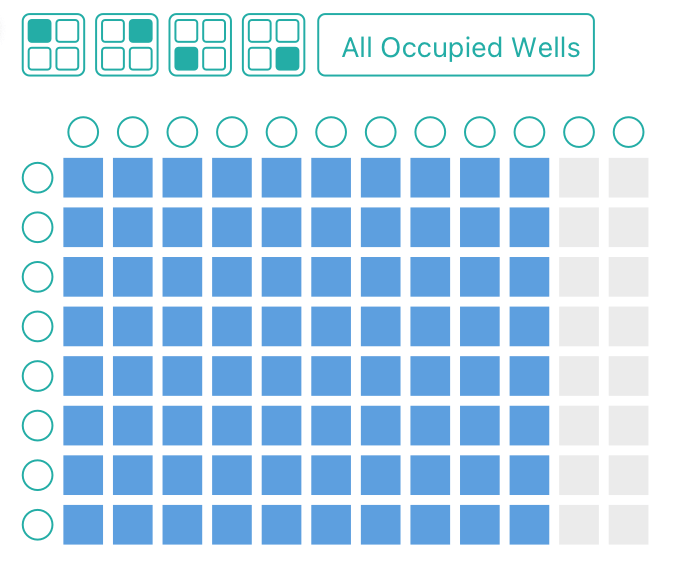
Users wanted a quick way to select “quadrants” of wells within each plate
Working through the details was tricky
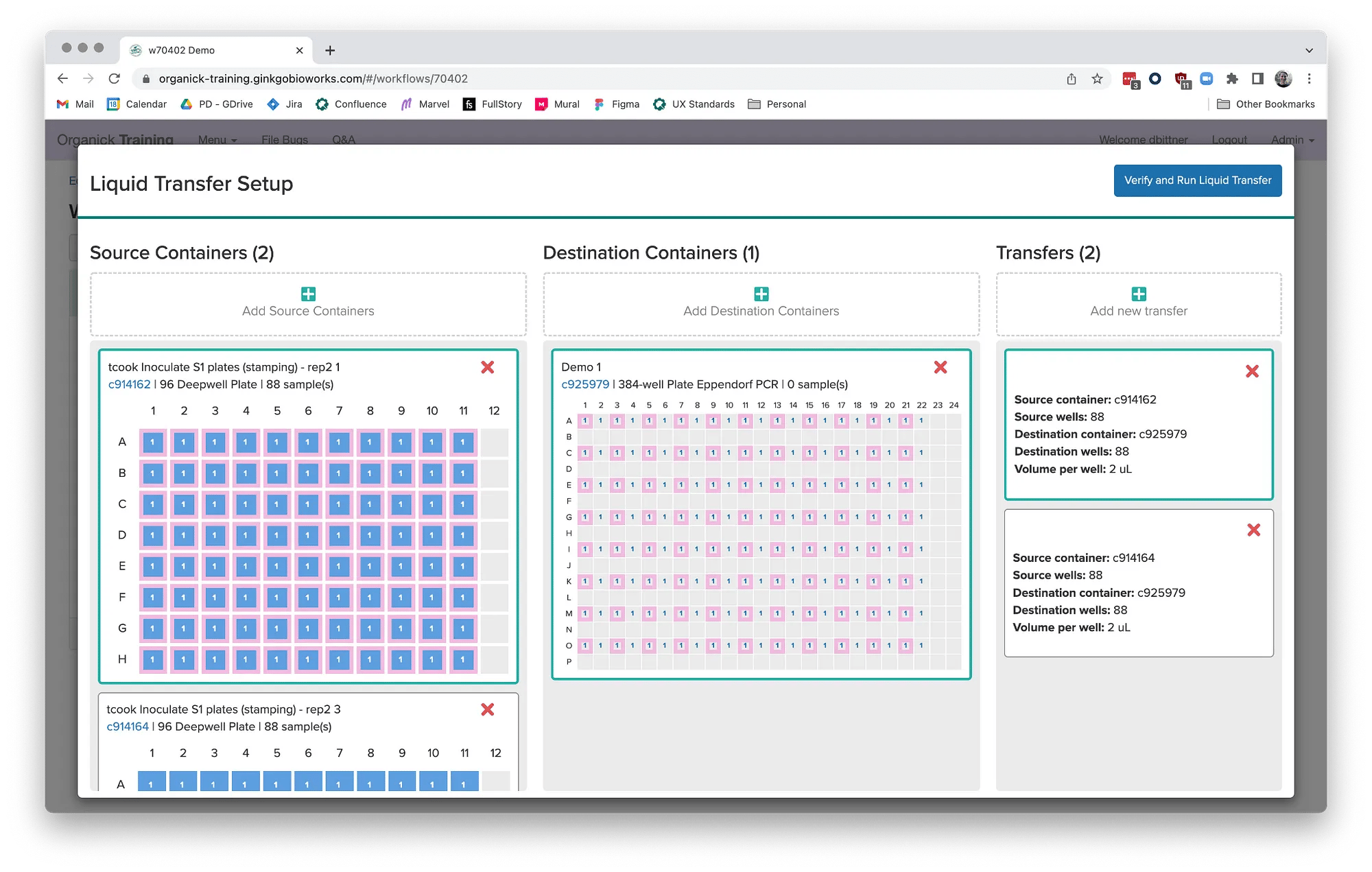
- The hardest part was designing visual encodings for the sample selection widget
- Each container well rendered at 16 x 16px and I needed to pack a lot of information into a small space
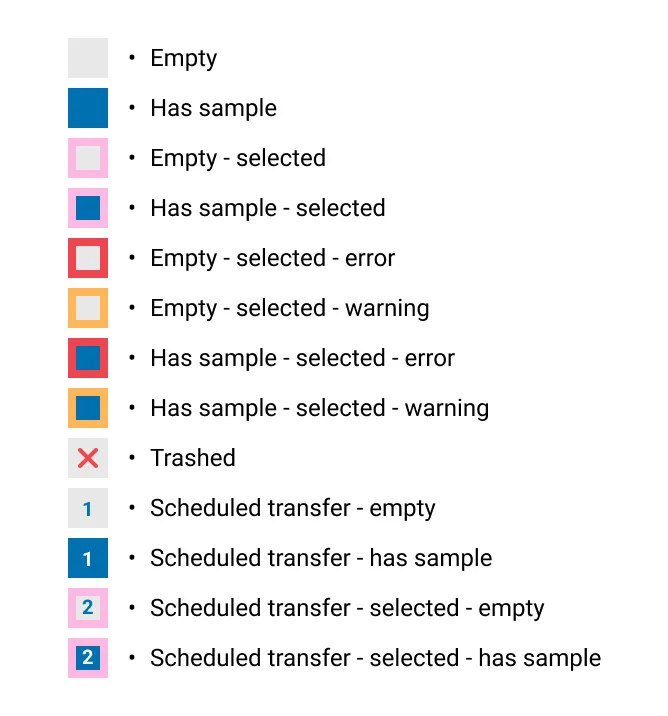
Legend to keep track of all the possible states for a container well
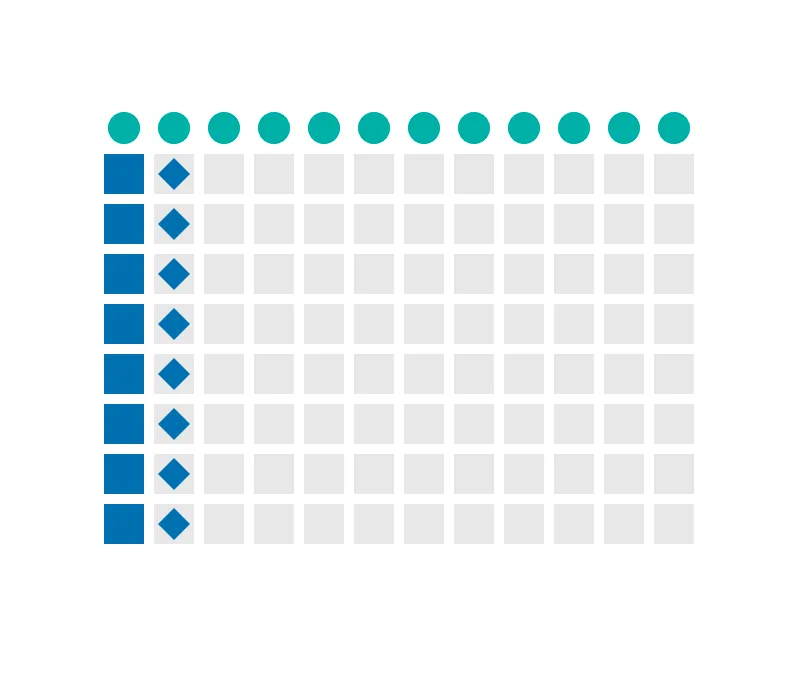
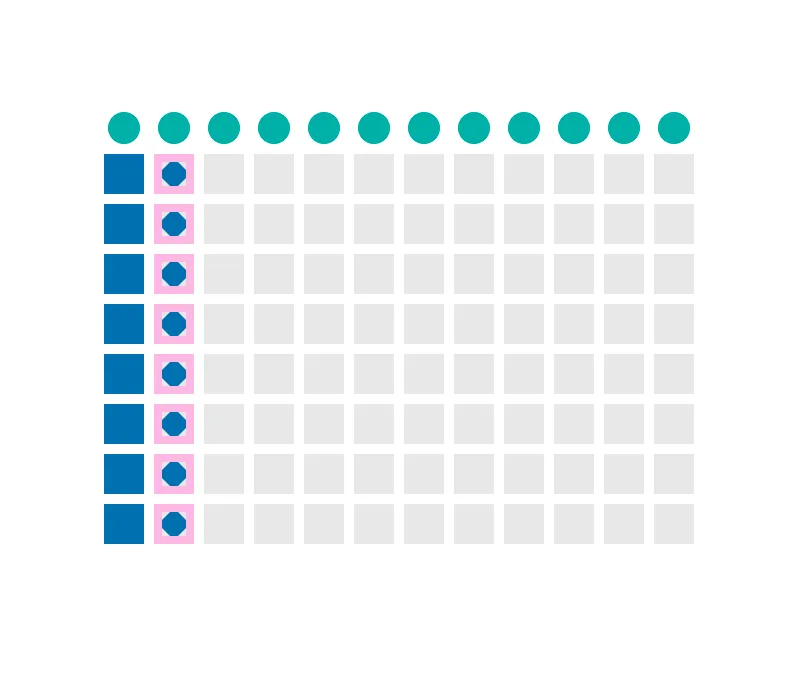
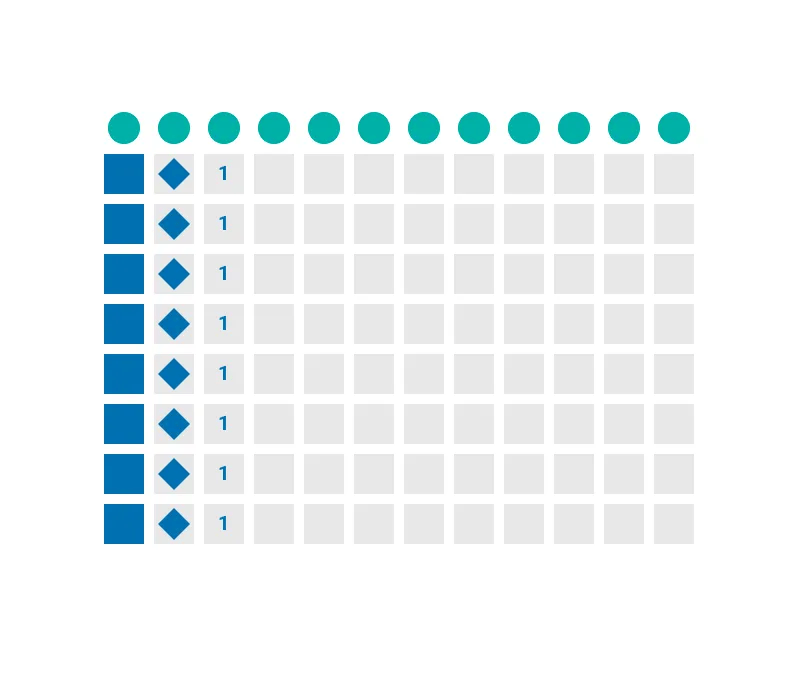
Can scientists intuitively understand the visual language?
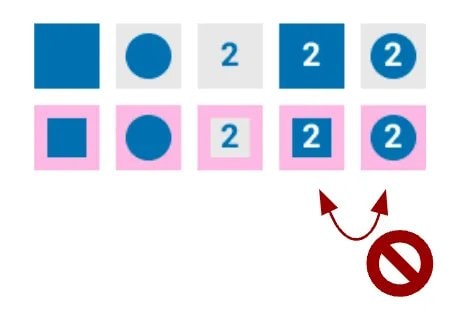
I scrapped this design, it was too slow to read and determine the difference
Working through the details was tricky
- The engineers shared feedback on technical feasibility and used the designs to inform their data models
- One of the engineers built the original software and was eager for the opportunity to improve it
- The PMs participated in each round of user testing
- We all worked together to solve for unexpected edge cases uncovered during coding
We ran hallway testing to catch any last-minute issues
- I suggested we run hallway testing and helped write an interview guide
- The PM and an engineer paired up to run the testing (I couldn’t attend that day)
- Together they intercepted 17 scientists in the cafeteria
- The hallway testing resulted in numerous improvements prior to launching the MVP
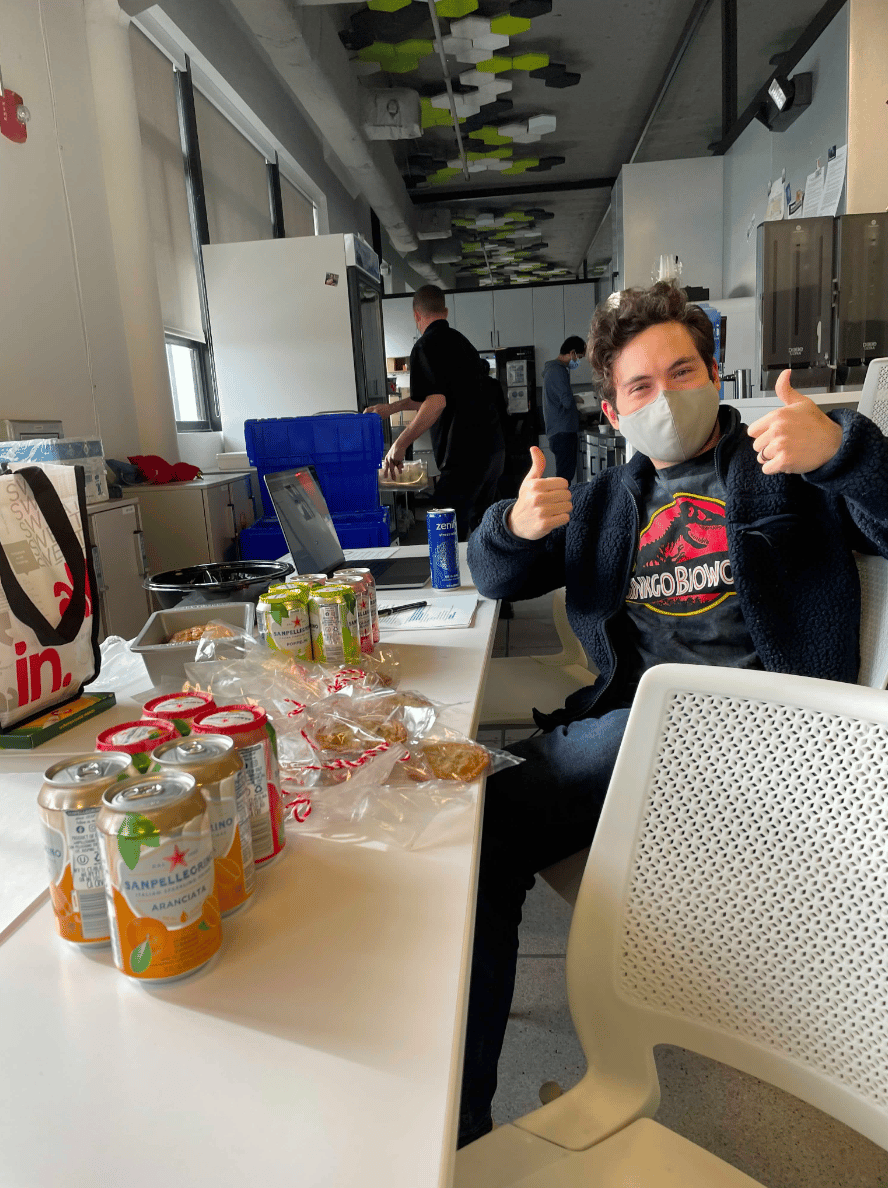
Ryan, a software engineer, in the cafeteria exchanging snacks for user tests
We benchmarked the old UX vs the new MVP
- My teammate (the PM/UX’er) identified 3 critical tasks to be our benchmark KPIs
- She ran a benchmarking study with 8 participants
- She timed the same task on the old UI vs the new UI
- She did not offer assistance, ask questions, or encourage participants to think out loud for this style of testing
- I helped her with the data analysis
Outcomes
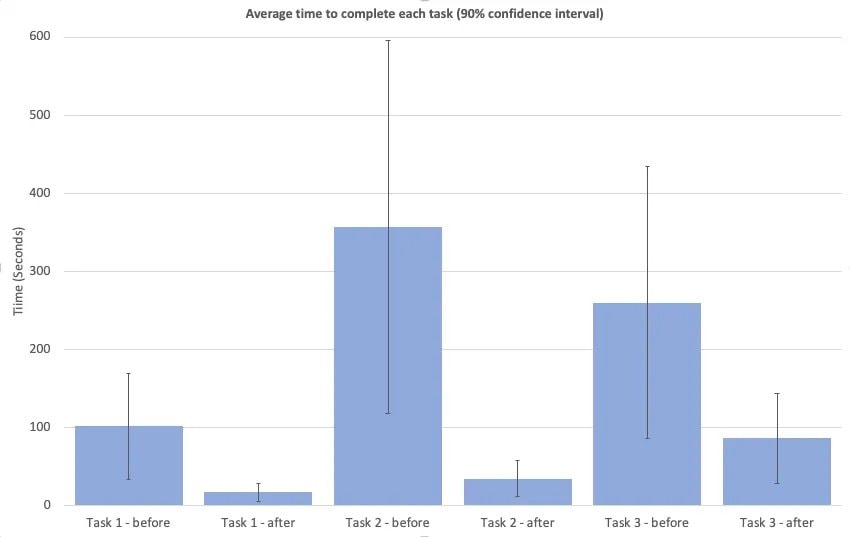
Benchmarking showed big improvements
- We were thrilled with the improvements for task 1 and task 2
- We were surprised just how much the MVP outperformed the old UI in task 3. (Task 3 required some manual clicking in the MVP that we later automated away)
“It’s especially good for new people who haven’t used liquid transfer before. It’s faster for them to catch up”
“This was super easy”
“I tried using it without any documentation, which is my idea of good software. It didn’t take me long to figure it out”
Ginkgo scientists execute these tasks hundreds to thousands of times per day. This had a huge impact on the company’s bottom line.
I handed the project off to a fellow designer who continued to iterate and improve upon the MVP
- One of the PMs for this project ended up switching careers to UX
- I encouraged her to continue on this project in her new UX role
- I offered plenty of support and guidance as she encountered new design challenges. I’m very proud of the amazing designs she later created
- The development team spent the next 2 years delivering powerful new features on top of the design patterns I established

Next case study

Liquid handling robot controller
Design challenge
A quick science lesson
- For the sake of this case study, consider a biology experiment the act of mixing various liquids together and measuring the outcome
- Scientists at Ginkgo use robots to mix tiny amounts of liquid inside containers. Containers typically have 96 or 384 wells, laid out in a grid
- Inside each well is a sample of liquid that plays a role in the experiment. Samples can be DNA, cells, chemical reagents, controls, etc.
- Scientists need to instruct robots when and where to mix each sample prior to running their experiment
Robot transferring liquid
Ginkgo scientists need easy-to-use robots
- For Ginkgo scientists, access to automation can be either a luxury or obstacle. New employees join as experts in their field (biology.) They aren’t necessarily experts at programming robots
- The software used to control robots needs to be efficient with a low learning curve
- If the software is too hard to use, scientists will opt to run experiments the ‘old fashioned way’ (by hand), which is slow and error prone
As Ginkgo scales, the business cost of inefficient software multiplies
Scientists used robots more and more each month
The old software wasn’t meeting their needs
- The old software was built while Ginkgo was in it’s early-stage startup phase, there was no designer (or PM) at the time
- Users were abandoning the software in favor of DIY workarounds, they weren’t tracking their experiments using Ginkgo systems
- From prior research, we knew it took months before scientists could run their own experiments on the Ginkgo platform, this software was a big culprit
“The software provides the functionality you need to do your work, but the UI is not the most intuitive”
“It’s much faster and cheaper to do liquid transfers by hand if it’s small scale.”
“I find it frustrating to spend a lot of effort creating a beautiful liquid transfer only to find that I messed up.”
The old software was confusing
It was time for a redesign
- The new design should require little to no training
- The new design patterns must be flexible and extend to future use cases
- Setting up an experiment for a robot should take less time than it takes to execute the same experiment at the lab bench
Actions taken
We formed a team
- I worked with 5 developers, 1 PM, and a PM/UX hybrid
- The PM/UX person was considering a career change to UX. She lead the discovery research that fed into this project, and contributed to most of the user research highlighted in this case study. I showed her the ropes and walked her through my UX process at every step. (She eventually transitioned to a full-on UX designer and took over this project for 2 more years)
Sketching helped me explore many ideas quickly
I used sketching to lay out the new interface and establish an information hierarchy
Prototypes were a quick, cheap way to bring ideas to life
Rapidly iterating through interaction and layout ideas
I tested with paper prototypes for fast feedback
- Once I was happy with the first round of designs I printed out each screen and showed them to 10 scientists over 2 rounds of feedback
- I gave each user testing participant a marker and encouraged them to draw on top of the prototypes. I asked them to think out loud as they went through each screen
- I also prepared some questions to probe their mental models and understand key concepts
Do scientists consider the right image 1 transfer, or 64?
I evaluated other designs in the wild
- Several participants pointed me towards a piece of software with a similar interaction (used for a different purpose)
- They particularly liked the selection buttons at the bottom of the screen
- I incorporated similar selection buttons in my prototypes
Users wanted a quick way to select “quadrants” of wells within each plate
Working through the details was tricky
- The hardest part was designing visual encodings for the sample selection widget
- Each container well rendered at 16 x 16px and I needed to pack a lot of information into a small space
Legend to keep track of all the possible states for a container well
Can scientists intuitively understand the visual language?
I scrapped this design, it was too slow to read and determine the difference
Working through the details was tricky
- The engineers shared feedback on technical feasibility and used the designs to inform their data models
- One of the engineers built the original software and was eager for the opportunity to improve it
- The PMs participated in each round of user testing
- We all worked together to solve for unexpected edge cases uncovered during coding
We ran hallway testing to catch any last-minute issues
- I suggested we run hallway testing and helped write an interview guide
- The PM and an engineer paired up to run the testing (I couldn’t attend that day)
- Together they intercepted 17 scientists in the cafeteria
- The hallway testing resulted in numerous improvements prior to launching the MVP
Ryan, a software engineer, in the cafeteria exchanging snacks for user tests
We benchmarked the old UX vs the new MVP
- My teammate (the PM/UX’er) identified 3 critical tasks to be our benchmark KPIs
- She ran a benchmarking study with 8 participants
- She timed the same task on the old UI vs the new UI
- She did not offer assistance, ask questions, or encourage participants to think out loud for this style of testing
- I helped her with the data analysis
Outcomes
Benchmarking showed big improvements
- We were thrilled with the improvements for task 1 and task 2
- We were surprised just how much the MVP outperformed the old UI in task 3. (Task 3 required some manual clicking in the MVP that we later automated away)
“It’s especially good for new people who haven’t used liquid transfer before. It’s faster for them to catch up”
“This was super easy”
“I tried using it without any documentation, which is my idea of good software. It didn’t take me long to figure it out”
Ginkgo scientists execute these tasks hundreds to thousands of times per day. This had a huge impact on the company’s bottom line.
I handed the project off to a fellow designer who continued to iterate and improve upon the MVP
- One of the PMs for this project ended up switching careers to UX
- I encouraged her to continue on this project in her new UX role
- I offered plenty of support and guidance as she encountered new design challenges. I’m very proud of the amazing designs she later created
- The development team spent the next 2 years delivering powerful new features on top of the design patterns I established
Next case study
Liquid handling robot controller
Design challenge
A quick science lesson
- For the sake of this case study, consider a biology experiment the act of mixing various liquids together and measuring the outcome
- Scientists at Ginkgo use robots to mix tiny amounts of liquid inside containers. Containers typically have 96 or 384 wells, laid out in a grid
- Inside each well is a sample of liquid that plays a role in the experiment. Samples can be DNA, cells, chemical reagents, controls, etc.
- Scientists need to instruct robots when and where to mix each sample prior to running their experiment
Robot transferring liquid
Ginkgo scientists need easy-to-use robots
- For Ginkgo scientists, access to automation can be either a luxury or obstacle. New employees join as experts in their field (biology.) They aren’t necessarily experts at programming robots
- The software used to control robots needs to be efficient with a low learning curve
- If the software is too hard to use, scientists will opt to run experiments the ‘old fashioned way’ (by hand), which is slow and error prone
As Ginkgo scales, the business cost of inefficient software multiplies
Scientists used robots more and more each month
The old software wasn’t meeting their needs
- The old software was built while Ginkgo was in it’s early-stage startup phase, there was no designer (or PM) at the time
- Users were abandoning the software in favor of DIY workarounds, they weren’t tracking their experiments using Ginkgo systems
- From prior research, we knew it took months before scientists could run their own experiments on the Ginkgo platform, this software was a big culprit
“The software provides the functionality you need to do your work, but the UI is not the most intuitive”
“It’s much faster and cheaper to do liquid transfers by hand if it’s small scale.”
“I find it frustrating to spend a lot of effort creating a beautiful liquid transfer only to find that I messed up.”
The old software was confusing
It was time for a redesign
- The new design should require little to no training
- The new design patterns must be flexible and extend to future use cases
- Setting up an experiment for a robot should take less time than it takes to execute the same experiment at the lab bench
Actions taken
We formed a team
- I worked with 5 developers, 1 PM, and a PM/UX hybrid
- The PM/UX person was considering a career change to UX. She lead the discovery research that fed into this project, and contributed to most of the user research highlighted in this case study. I showed her the ropes and walked her through my UX process at every step. (She eventually transitioned to a full-on UX designer and took over this project for 2 more years)
Sketching helped me explore many ideas quickly
I used sketching to lay out the new interface and establish an information hierarchy
Prototypes were a quick, cheap way to bring ideas to life
Rapidly iterating through interaction and layout ideas
I tested with paper prototypes for fast feedback
- Once I was happy with the first round of designs I printed out each screen and showed them to 10 scientists over 2 rounds of feedback
- I gave each user testing participant a marker and encouraged them to draw on top of the prototypes. I asked them to think out loud as they went through each screen
- I also prepared some questions to probe their mental models and understand key concepts
Do scientists consider the right image 1 transfer, or 64?
I evaluated other designs in the wild
- Several participants pointed me towards a piece of software with a similar interaction (used for a different purpose)
- They particularly liked the selection buttons at the bottom of the screen
- I incorporated similar selection buttons in my prototypes
Users wanted a quick way to select “quadrants” of wells within each plate
Working through the details was tricky
- The hardest part was designing visual encodings for the sample selection widget
- Each container well rendered at 16 x 16px and I needed to pack a lot of information into a small space
Legend to keep track of all the possible states for a container well
Can scientists intuitively understand the visual language?
I scrapped this design, it was too slow to read and determine the difference
Working through the details was tricky
- The engineers shared feedback on technical feasibility and used the designs to inform their data models
- One of the engineers built the original software and was eager for the opportunity to improve it
- The PMs participated in each round of user testing
- We all worked together to solve for unexpected edge cases uncovered during coding
We ran hallway testing to catch any last-minute issues
- I suggested we run hallway testing and helped write an interview guide
- The PM and an engineer paired up to run the testing (I couldn’t attend that day)
- Together they intercepted 17 scientists in the cafeteria
- The hallway testing resulted in numerous improvements prior to launching the MVP
Ryan, a software engineer, in the cafeteria exchanging snacks for user tests
We benchmarked the old UX vs the new MVP
- My teammate (the PM/UX’er) identified 3 critical tasks to be our benchmark KPIs
- She ran a benchmarking study with 8 participants
- She timed the same task on the old UI vs the new UI
- She did not offer assistance, ask questions, or encourage participants to think out loud for this style of testing
- I helped her with the data analysis
Outcomes
Benchmarking showed big improvements
- We were thrilled with the improvements for task 1 and task 2
- We were surprised just how much the MVP outperformed the old UI in task 3. (Task 3 required some manual clicking in the MVP that we later automated away)
“It’s especially good for new people who haven’t used liquid transfer before. It’s faster for them to catch up”
“This was super easy”
“I tried using it without any documentation, which is my idea of good software. It didn’t take me long to figure it out”
Ginkgo scientists execute these tasks hundreds to thousands of times per day. This had a huge impact on the company’s bottom line.
I handed the project off to a fellow designer who continued to iterate and improve upon the MVP
- One of the PMs for this project ended up switching careers to UX
- I encouraged her to continue on this project in her new UX role
- I offered plenty of support and guidance as she encountered new design challenges. I’m very proud of the amazing designs she later created
- The development team spent the next 2 years delivering powerful new features on top of the design patterns I established
Next case study